A garbage disposal is one of the most convenient appliances in a kitchen until it goes dead. When you find that your disposal does not start, does not grind, or even turns off when you are using it, there is no need to panic. Most units have a built-in safety option that enables you to reset them within a few seconds.
This guide describes the reasons why a garbage disposal breaks, how to restart it without breaking it, and what to do when a simple reset fails to resolve the issue.
Why Your Garbage Disposal May Need a Reset
It is important to know why a disposal may not work in the first place before you embark on the reset process. Most units automatically shut down to avoid damage to the motor.
Common Reasons for a Shutdown
Overheating – Relatively long or insufficient water in the disposal
Jamming – An object that is difficult to move or stuck in it; thus, the blades cannot rotate
Electrical overload – This is when the internal breaker blows out due to a sudden burst of electrical current or a heavy load.
Foreign objects – Silverware, bottle tops, or other objects get trapped
When any of these problems arise, the internal reset button of the disposal tends to pop out and interrupt the power to save the motor.
Safety First: What to Do Before You Start
Dealing with a garbage disposal is not something that is harmful as long as you observe safety procedures. Always be careful of putting your hands anywhere near the unit.
Turn the Power Off
Although the disposal may not be operational, still switch it off. Unplug your unit if it is under the sink. If hardwired, then you can switch off the kitchen breaker to add an additional level of security.
Never Use Your Bare Hands Inside the Disposal
When something is stuck, use tongs, pliers, or a wooden spoon–never fingers.
Have a Flashlight Ready
Disposals are placed in dark cabinets. Proper lighting enables you to know whether there is something covering the blades.
Step by Step: How to Reset Your Garbage Disposal
The vast majority of garbage disposals (InSinkErator, Waste King, or any other brand) work in the same way. The reset button is normally a small red or black button located at the bottom of the unit.
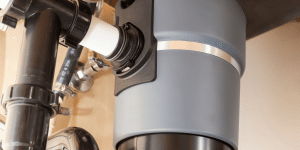
Here’s how to reset it safely:
Step 1: Locate the Reset Button
- Check below the disposal unit.
- There is a red little button that should be visible.
- If you cannot see it clearly, use your flash light.
Step 2: Press the Reset Button
- Press the button down firmly.
- When it clicks, then the internal breaker has been tripped.
- And when it does not click, it might not require a reset, or there might be yet another problem with your disposal.
Step 3: Restore Power
- Switch the breaker on again.
- Ensure that the wall switch is turned off and then try it.
Step 4: Run Water
Turn on cold running water in the sink for 10-15 seconds, and turn on the disposal. This limits the load on the motor.
Step 5: Test the Disposal
- Flip the switch.
- When it starts running normally, then you are good.
- If it vibrates without turning, it is jammed.
- When it does not produce any sound, begin troubleshooting.
How to Fix a Garbage Disposal That Hums or Is Jammed
A humming sound indicates that there is power to the motor, but something is stopping the blades. Starting over will never solve this problem; you will need to remove the jam.
Step 1: Turn off and Unplug the Unit
Always turn off the power–safety first.
Step 2: Foreign Objects Check
Using a flashlight, look for:
- Bones
- Fruit pits
- Silverware
- Plastic
- Bottle caps
Tongs or pliers can be used to take out anything you see.
Step 3: Use an Allen Wrench
- Most disposals include a 1/4-inch Allen wrench (hex key).
- Put the key in the small hole at the bottom middle of the disposal.
- Turn it back and forth a few times.
- This is done manually to spin the grinding plate and is necessary to loosen the jam.
- Unless you have the original wrench, any 1/4-inch hex key available at any hardware store will do the job.
Step 4: Press Reset Button Once Again
Press the reset button again after clearing the jam and spinning the plate.
Step 5: Test the Unit
- Turn on power, turn on some cold water, and turn on the disposal.
- In some cases, it is impossible to resolve the issue by simply pressing the reset button.
If the Reset Button Doesn’t Work
Sometimes pressing the reset button won’t solve the problem. Here are common reasons and what to do next.
The Disposal Doesn’t Make Any Noise
If it’s silent:
- Check if it’s plugged in.
- Test another appliance to determine whether the outlet functions or not.
- Press the GFCI reset button if it has one.
The Reset Button Does Not Stay In
If the button will not remain pressed:
- Allow 10 minutes to elapse so the motor cools.
- Try again. If it continues to pop out, the motor can be overheated or broken.
The Disposal Is Leaking
Resetting won’t help leaks. Common places for leaks:
- Sink flange
- Dishwasher connection
- End of the piece (usually means that the disposal has become worn out)
Burning Smell
If you smell burning:
Do not keep trying to run it. The motor may be failing.
When to Call a Professional
You have reset, cleared jams, checked the power but still the disposal will not run.
The following are the situations when it is time to hire a professional:
- The unit makes the breaker turn off.
- Water is leaking down the bottom.
- The motor won’t stop humming.
- You have an electrical burning odor.
- The reset button juts with each use.
With older units (8-12 years old), the cost of replacement of the disposal can be less expensive than the cost of repair.